
How to Create Unlimited AI Videos for Free Using Creative Fabrica Studio AI

Watched the video already? Scroll down to grab the character images, image generation prompt, and Seedance 2.0 video prompt I used in the demo — all free to use for your own projects.
What Is Creative Fabrica Studio AI?
Creative Fabrica Studio AI is a web-based platform that brings together multiple state-of-the-art AI video generation models under one roof. Instead of subscribing to each model separately, you get access to Seedance 1.5, Seedance 2.0, Kling 3.0, Veo 3.1, Grok Imagine, Luma Ray 2, Runway 4.5, Pika 2.1, and more — all from a single dashboard.
The best part? You can start with a 30-day free trial, which credits your account with 30,000 coins, giving you real creative firepower before spending a single rupee.
How to Get Your 30,000 Free Coins
When you first sign up, Creative Fabrica gives you only 5,000 coins — not enough for a meaningful video. Here is how to unlock the full trial:
Log in to studio.creativefabrica.com
Click the "Go Pro for Free" button on your dashboard
A window titled "Try Studio AI for Free" will open
Enter your billing information and activate the 30-day free trial
Your account is credited with 30,000 coins instantly
You can cancel any time within the 30-day window — no charge
What Can You Make With 30,000 Coins?
Different models have different credit costs. Here is a quick breakdown:
Model | Resolution | Duration | Coins Used |
Veo 3.1 Fast | 720p or 1080p | 6 seconds | ~24,000 |
Grok Imagine Video | 720p only | 6 seconds | Within 30K |
Seedance 2.0 | Multiple | Up to 11 seconds | Within 30K |
Kling 3.0 | Multiple | Up to 13 seconds | Within 30K |
With Veo 3.1 Fast, coin cost depends only on video duration — not resolution. So 720p and 1080p cost the same, which is a generous parity.
Character Locking: The Feature That Changes Everything
One of the most powerful features in Creative Fabrica is character locking — the ability to define your characters once and maintain their appearance consistently across multiple shots and videos.
Character locking is available in three models: Grok Imagine, Seedance 2.0, and Happy Horse.
How to Create a Custom Character
Open the video generator workspace
Click the Character icon at the top of the workspace
In the pop-up, go to the My Characters tab and click Add
Click "Create Character" to define a custom character
Enter a character name and a @username (you will reference this in prompts)
Upload 3 or more reference images of the character
Optionally upload a video reference and an audio reference (for voice consistency)
Click "Create Character" — it now appears under My Characters
In your video prompt, simply type @username and the platform pulls in your character's reference automatically.
The Demo Video I Created
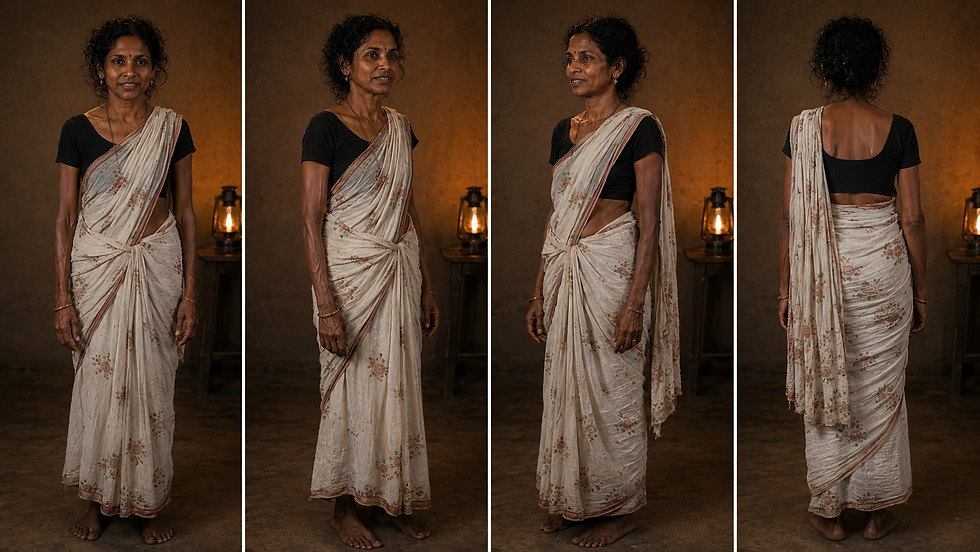
In the tutorial, I demonstrate a complete AI video workflow using Seedance 2.0 with two custom characters — a male character and a female character — generated from reference images I created using an AI image tool.
Below are the exact assets I used. You can download the character images and use the prompts directly in Creative Fabrica Studio AI.
Male Character Reference Image

Female Character Reference Image
The Image Generation Prompt
I used the following prompt to generate the character reference images before uploading them to Creative Fabrica's character system:
A photorealistic cinematic medium two-shot of a middle-aged Tamil village couple in a tense, emotional argument inside a dimly lit rustic kitchen at night. On one side, a Tamil woman with curly dark hair, wearing a light-cream floral print saree and a black blouse, has a tearful, exhausted expression. Facing her, a Tamil man with short grey-streaked hair and a mustache, wearing a light yellow-striped collared shirt with a cotton scarf (thundu) around his neck, looks back with defensive regret. The background features earthy mud-plastered walls and simple wooden furniture. A single warm, flickering oil lantern on a table between them casts dramatic shadows and a soft orange glow. Highly detailed facial expressions, shallow depth of field, 35mm film aesthetic, moody atmosphere, 16:9 aspect ratio.The Seedance 2.0 Video Prompt
This is the exact prompt I used inside Creative Fabrica Studio AI to generate the demo video shown in the tutorial, with both characters referenced using their @usernames:
[FORMAT]10-second cinematic video, 16:9 aspect ratio, 2K resolution, photorealistic, 35mm film aesthetic, cinematic lighting.[REFERENCE ROLES] @femalechr = The Tamil village woman, with curly dark hair, wearing a light-cream floral print saree with a black blouse.@malechr = The Tamil village man, with short grey-streaked hair, wearing a light yellow/cream striped collared shirt and a blue-and-white checked dhoti (lungi) with a cotton thundu (scarf) around his neck.[AESTHETIC & SETTING]A dimly lit, rustic Tamil village kitchen at night @img1 . Earthy mud-plastered walls and simple dark wooden furniture. A single warm, flickering oil lantern (matching the background of @image1) casts long, dramatic shadows. Heavy emotional tension, shallow depth of field, organic film grain, and natural facial micro-expressions.[TIMELINE]0-3s | Shot 1: Medium close-up of the woman (@femalechr ). She is visibly exhausted, eyes watery with tears. She puts a rustic ceramic plate down too hard on a dark wooden table, creating a sharp clink sound. Looking off-camera toward the man (@malechr ), she says in a trembling, frustrated voice: “You never listen to me.”3-6s | Shot 2: Cut to a medium close-up of the man (@malechr ). He is initially facing away, but immediately spins around, eyes wide with defensiveness and jaw tight. He gestures with his hand and shouts loudly: “Because you never stop blaming!”6-8s | Shot 3: Cut to an extreme close-up of the woman (@femalechr ). She exhales shakily, her shoulders dropping. With a cracked, fragile voice, she says: “I’m not blaming… I’m begging.”8-10s | Shot 4: Cut back to a medium close-up of the man (@malechr ). His defensive stance collapses. He sighs heavily, looking down in deep regret, then looks up at her with soft, sorrowful eyes. He speaks softly and quietly: “I don’t know how to fix this.”[AUDIO & TEXT]Enable natural audio generation. Synced realistic dialogue with Indian-accented English. Low ambient silence with subtle outdoor cricket chirps. A single, soft melancholy piano chord enters at 8s and fades out. Real-time subtitles appear centered at the bottom.Tips to Maximize Your 30,000 Free Coins
Plan before generating. Every failed generation costs coins. Write your prompt carefully, review it, then submit.
Use Seedance 2.0 for character-consistent narrative videos. The character locking feature in Seedance 2.0 is mature and reliable for storytelling content.
Use Veo 3.1 Fast for cinematic one-shot videos. The start-frame and end-frame control gives you precise composition that other models lack.
Run multiple accounts if you need volume. Once your 30,000 coins are exhausted, you can create a new account with a different email — a Google account is not required.
Watch the Full Tutorial
Everything covered in this blog is demonstrated live in the video — including the workspace walkthrough, character creation, and the complete video generation process from prompt to final output.


Comments